This article explains the core Rich Communication Services (RCS) message types, components, and interaction options available in Cheetah Digital. Use it as a reference when planning or building RCS campaigns and conversation flows.
Text messages
Text messages are the simplest and most flexible RCS message type. They’re ideal for clear, straightforward communication that doesn’t require visuals.
Use text messages to:
- Send service updates or alerts
- Deliver transactional messages
- Share order or appointment confirmations
- Communicate time‑sensitive information
Specifications
| Specification | Details |
|---|---|
|
Maximum length |
160 characters |
|
Media support |
Not supported |
Best practices
- Keep messages concise and easy to scan
- Prioritize the most important information first
- Use suggested replies or actions when you want recipients to respond quickly.
Rich Cards
Rich cards combine media, text, and interactive actions into a single RCS message. They are designed to highlight one key message and guide recipients toward a next step.
You can send:
- A single rich card
- Multiple rich cards grouped into a carousel
A rich card can include any of the following components:
All components are optional, but you must include at least one of the following:
- Media (image or video)
- Title
- Description
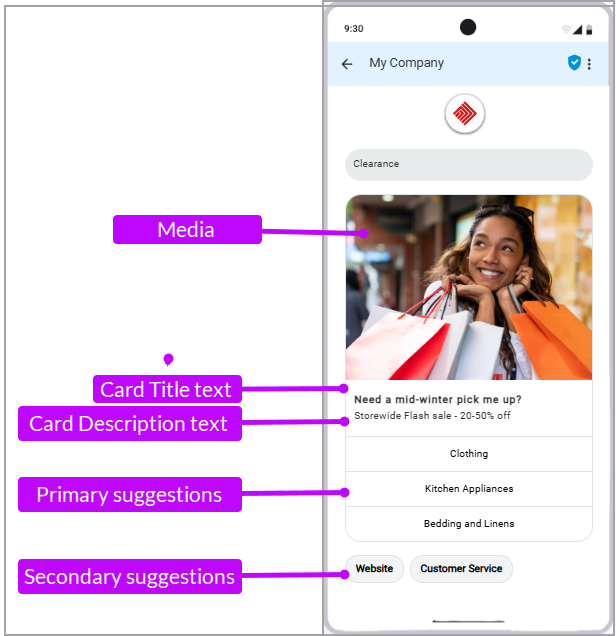
First/ Welcome Message
An opening pitch, introduction or welcome to the rich message. This is the message the users will see before the carousel.
Note: When First/ Welcome messages are used with a rich card, the delivery order may vary depending on device and network behavior. To provide a consistent experience, make sure this message is relevant whether it appears before or after the rich card.
Specifications
Specification Details Maximum length
2000 characters
Other characters Emojis and some special characters are allowed and may count as multiple characters Best practices
- Use short paragraphs or concise sentences
- Focus on value and clarity
- Avoid repeating the title text
Media - Image messages
Media is the visual anchor of your rich card and appears at the top. Cheetah Digital follows the most commonly used vertical layout.
Image messages are Rich RCS message type that lets you include high‑quality visuals to make your message more engaging and informative. The image can be combined with other Rich card elements such as title, message text, reply buttons and chips.
Use image messages to:
- Promote products or offers
- Share QR codes
- Highlight event details
- Provide visual instructions or guides
Note: The user will incur additional charges to receive this message.
Specifications
| Specification | Details |
|---|---|
|
Supported formats |
JPG, JPEG, PNG, GIF |
| Media height | 168 dp (medium) - dp (density-independent pixels) helps ensure media displays consistently across screen sizes |
|
URL requirements |
Image URLs must be publicly accessible or uploaded to Cheetah Digital |
| File names |
The file names can't contain any spaces, dashes, or special characters (except _underscores). The file names and their storage folder names will be saved and displayed only as lower case, even if they contain upper case when uploaded. Also, the file extensions should be in lowercase. The lower case names will be rendered in the URL of the hosted items. |
Best practices
- If your image doesn’t match the required specifications, the message carrier partners will automatically center and crop it.
- Use high-resolution images optimized for mobile viewing
- Avoid placing critical text near image edges, as some devices may crop images differently
- Use visuals that clearly support the message goal
Media - Video messages
Video messages allow you to send short video clips that communicate more detail in a highly engaging way. The video can be combined with other Rich card elements such as title, message text, reply buttons and chips.
Use video messages to:
- Share product demos or tutorials
- Announce events or launches
- Deliver personalized or branded content
Note: The user will incur additional charges to receive this message.
Specifications
| Specification | Details |
|---|---|
|
Supported formats |
MP4 |
| Media height | 168 dp (medium) - dp (density-independent pixels) helps ensure media displays consistently across screen sizes |
| Maximum File size | 100MB |
|
Recommended length |
Video URLs must be publicly accessible or uploaded to Cheetah Digital. |
| File names |
The file names can't contain any spaces, dashes, or special characters (except _underscores). The file names and their storage folder names will be saved and displayed only as lower case, even if they contain upper case when uploaded. Also, the file extensions should be in lowercase. The lower case names will be rendered in the URL of the hosted items. |
Note: Cheetah Digital does not validate the size of the video file included in your RCS message. You must ensure that the video file complies with the supported size limits. After you add the video file, its size may sometimes be unavailable. In these cases, the Campaign's Content tab displays the file size as Unavailable.
Best practices
- Keep videos short and focused on a single message
- Keep them optimized for mobile viewing
- Smaller video files are recommended to improve loading performance and maintain audience engagement. Because playback can vary by mobile carrier, we recommend keeping video files under 40 MB for consistent playback on Android and iPhone devices.
- When proofing, always check on both iOS and Android devices
Custom Video Thumbnail
Your device’s operating system displays a default thumbnail image for the video. Optionally, you can upload a custom video thumbnail image. The Custom Video Thumbnail field is displayed only when you select an MP4 file in the Media field.
Specifications
| Specification | Details |
|---|---|
|
Supported formats |
JPG, JPEG, PNG |
| Maximum File size | 100KB |
| File names |
The file names can't contain any spaces, dashes, or special characters (except _underscores). The file names and their storage folder names will be saved and displayed only as lower case, even if they contain upper case when uploaded. Also, the file extensions should be in lowercase. The lower case names will be rendered in the URL of the hosted items. |
Best practices
- It is recommended to keep the image size to 50KB or smaller for better delivery.
- Keep them optimized for mobile viewing
- When proofing, always check on both iOS and Android devices
Title text
The title is the headline for the card. It should quickly explain what the message is about.
Specifications
| Specification | Details |
|---|---|
|
Maximum length |
200 characters |
| Other characters | Emojis and some special characters are allowed and may count as multiple characters |
Best practices
- Keep titles short and action-oriented.
- Clearly explain the purpose of the message
Description text
The description provides supporting context for the title.
Use description to:
- Explain the offer or message
- Highlight key benefits
- Set expectations
- Reinforce the call to action
Specifications
| Specification | Details |
|---|---|
|
Maximum length |
2000 characters |
| Other characters | Emojis and some special characters are allowed and may count as multiple characters |
Best practices
- Use short paragraphs or concise sentences
- Focus on value and clarity
- Avoid repeating the title text
Suggested Replies and Actions
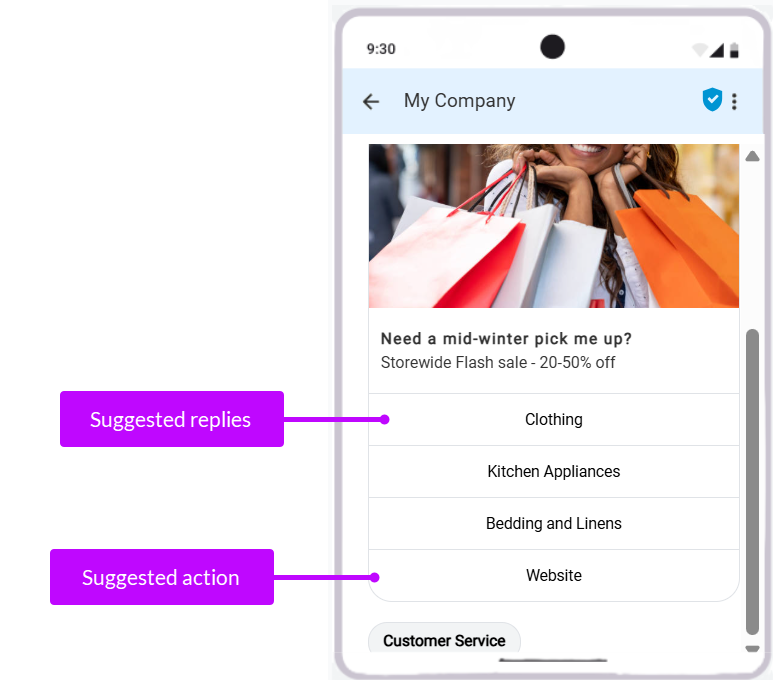
Suggestions allow you to use replies and actions in your RCS messages.and appear inside the card as buttons. Each suggestion represents a quick reply or an action the user can tap. The buttons appear as part of a card and users can return back to these buttons at any time to review the other options.
- Suggested Replies are predetermined responses that create conversation flow
- Suggested Actions enable users to perform an action
Specifications
| Specification | Details |
|---|---|
|
Maximum length |
25 characters |
| Maximum suggestions | Up to 3 Suggested Replies and 5 Suggested Actions per card. You can use a combination of Suggested Replies and Suggested Actions, but the total number of Suggestions cannot exceed 5. |
Best practices
- Use suggestions whenever free-text input is unnecessary
- Keep button wording short and easy to understand, with 2 to 4 words max
- Capitalize and bold Suggested Replies and Actions
- When there are more than one, add them as bulleted list
- Use action-oriented language (verb) to move the conversation forward. Examples: Contact Support, Reset Password, Shop Now, View Details, Track Order, Book Your Flight, View Itinerary, Claim Offer, Remind Me Later.
- Only include replies and actions relevant to the message
- Avoid overwhelming recipients with too many options. Less is more, too many cards, buttons, chips, replies create complexity that can disengage users.
Suggested Replies
Suggested replies are quick, tappable responses such as:
- Yes
- Show me more
- Remind me later
When used in campaigns, suggested replies help build conversation flows. Every Suggested Reply creates a new branch in a conversation flow.
A conversation flow is a predetermined sequence of connected messages, choices, and actions that guide recipients toward a specific goal. Conversation flows are not chatbots or open-ended live conversations.
Suggested Actions
Suggested actions trigger native device behaviors, such as:
- Open URL : Opens a webpage in the device browser or a supported app.
- Open URL in webview: Opens a webpage directly inside the messaging app.
- Click to call: Opens the device phone application with the target number prefilled.
- Add to calendar: Creates a calendar event using the recipient’s native calendar application.
Specifications
| Specification | Details |
|---|---|
| Open URL | Include a link to the webpage or mobile application. |
|
Click to call |
Enter a phone number starting with + and country code. Cannot exceed 15 digits. Dashes, spaces, parentheses, letters, periods, and extensions are not accepted. For example, +12223334444. |
| Add to calendar | Enter the event details, including the required time zone. Specify the event time using the 12-hour clock format (AM or PM). |
Best practices
- Choose the right suggested actions for your message
Suggestion Chips
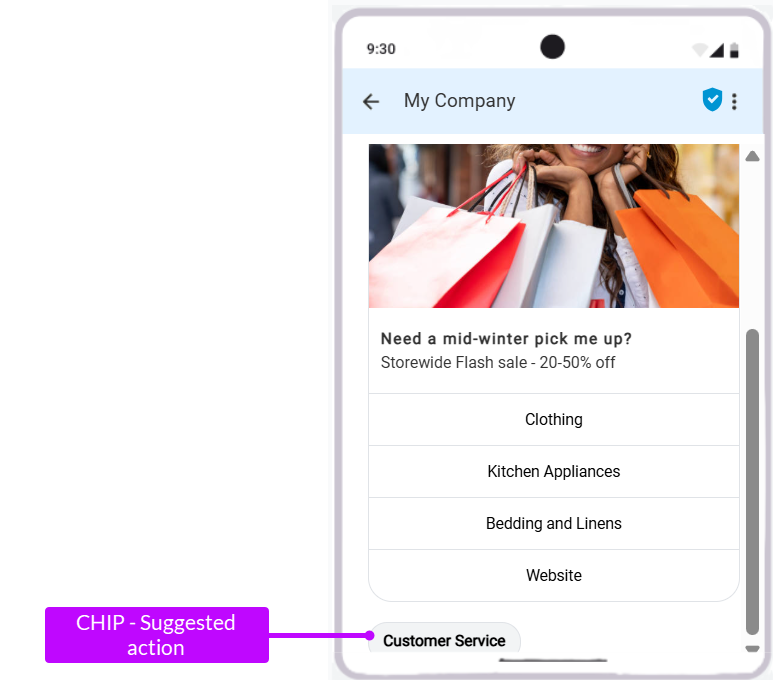
Suggestion Chips appear below the main message body, and can be either a reply or action as described above.
Unlike buttons embedded in cards, chips:
- Disappear after interaction
- Disappear when a newer message arrives
Specifications
| Specification | Details |
|---|---|
|
Maximum length |
25 characters |
| Maximum suggestions | 5 |
Best practices
- The options should move the conversation forward
- Not repeat options already shown in the card
- Not act as selection controls for carousel items
Rich card carousels
When multiple rich cards are created, they display as a carousel within a single message.
Use carousels to:
- Showcase multiple products
- Compare plans or packages
- Present related content
- Guide recipients through options
Specifications
| Specification | Details |
|---|---|
|
Maximum cards |
5 |
| Title | Max. 200 characters |
| Description | Max. 2000 characters |
| Height | Small: 542 DP max Medium: 592 DP max |
| Width | Small: 180 DP (fixed) Medium: 296 DP (fixed) |
Best practices
- Place the recommended or highest-value option first and clearly explain why it matters.
- Avoid repeating carousel content in suggestion chips displayed below the carousel.
RCS Conversation Flow
An RCS conversation flow is a structured, interactive message journey that guides recipients through a sequence of actions and decisions inside their messaging application.
Use Conversation flows to support goals such as:
- Product discovery
- Customer support
- Appointment confirmation
- Notifications
- Purchase journeys
Best practices
- Define the goal. For example, Support, Sales, Engagement, Notifications
- Map the journey. For example, User choices, Actions, Outcomes
- Prepare content. For example,, Messages, Media, Suggestions, Calls to action
Conversation flows vs chatbots
Unlike chatbots, conversation flows are intentionally designed pathways rather than open-ended conversations.
This gives marketers more control over:
- Messaging
- User experience
- Outcomes
- Conversion paths
Think of a conversation flow as a choose-your-own-path landing page delivered through messaging instead of a website.
Refer to the RCS User Guide for specific use cases on application of each of these components.
Use cases
Following use cases will guide you to design your RCS Campaigns: